
Windows SysinternalsはWindowsシステム管理やトラブルシューティングに役立つMicrosoft提供の無料のユーティリティ群です。そのため、このブログではSysinternalsの更新情報を随時提供しています。Sysinternalsのユーティリティの最新版はダウンロードサイト(https://learn.microsoft.com/ja-jp/sysinternals/downloads/、https://live.sysinternals.com/)から直接入手できますが、Windows 11の場合はMicrosoft Storeから入手、更新することもできます。一部のツールはLinuxやmacにも実装されており、OSS(オープンソースソフトウェア)として提供されています(注: Windows版のソースコードは非公開です)。
7・8月の更新まとめ、注目はZoomIt!
 2026年7月、8月には、Windows Sysinternalsのユーティリティの中でLiveKd v5.65、ProcDump v12.01、ZoomIt v12.11/v12.2/v12.21、NotMyFault v4.6、RDCMan v3.20/v3.21、CoreInfo v4.02、Process Explorer(Procexp) v17.13、Process Monitor(Procmon) v4.05/v4.1、PsPing v2.13がリリースされました。詳しくは、以下の公式ブログのアナウンスで確認してください。
LiveKd v5.65, ProcDump v12.01, and ZoomIt v12.11|Sysinternals Blog(Tech Community)[Jul 09, 2026]
NotMyFault, RDCMan, ZoomIt, CoreInfo, Process Explorer, Process Monitor, and PsPing|Sysinternals Blog(Tech Community)[Aug 12, 2026]
Process Monitor v4.1, ZoomIt 12.3 for macOS, RDCMan v3.21, and ZoomIt v12.21|Sysinternals Blog(Tech Community)[Jul 09, 2026]
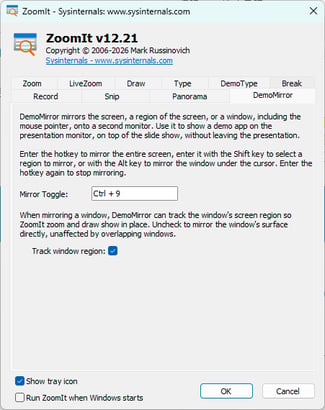
今回更新されたユーティリティの中で、ZoomItはv12.11、v12.2、v12.21と短い間隔で更新されています。v12.11では、画面の領域をクリップボードにコピーまたはファイルに保存できる「Snip(Ctl+Shift+6)」および「Panorama(Ctrl+Shift+8)」でJPEGとWEBP形式がサポートされました(画面1)。v12.2では、新たに「DemoMirror」機能が追加されました。DemoMirrorはカーソルのある画面全体(Ctrl+9)またはカーソルの下のウィンドウ(Ctrl+Alt+9)または領域(Ctrl+Shift+9)をセカンダリモニターにミラー表示できるもので、プレゼンテーション中のデモに役立ちそうです(画面2、画面3)。
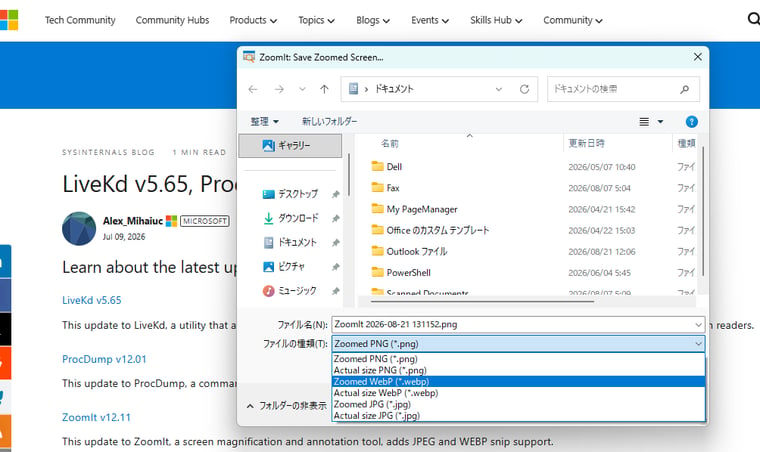
画面1 Snip(Ctl+Shift+6)とPanorama(Ctrl+Shift+8)のファイル保存形式として、JPEGとWEBP形式がサポートされた
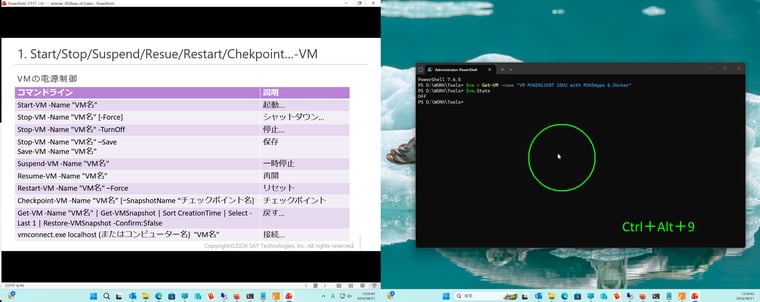
画面2 プレゼンテーション中、別の画面上のウィンドウ(この例ではコマンドプロンプト)にカーソルを合わせ、Ctrl+Alt+9を押すと...
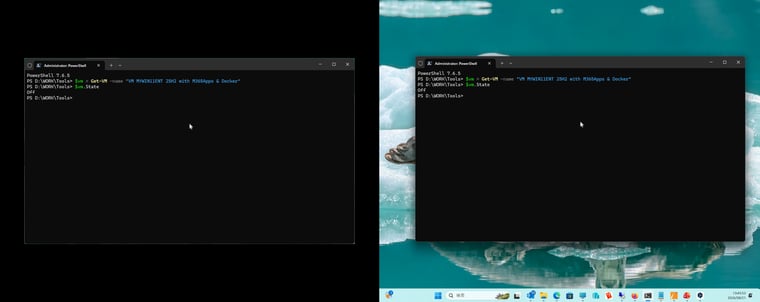
画面3 プレゼンテーション中の画面に上にコマンドプロンプトのウィンドウがミラー表示される
ZoomIt、この一年
Zoomitは、特に更新が多いユーティリティの1つです。以下は、過去1年のすべてのリリースです。バグ修正だけでなく、新機能も次々追加されていることがわかります。
ZoomIt v12.21 [Aug 19, 2026]
This update to ZoomIt, a screen magnification and annotation tool, fixes an application hang occurring when recording.
ZoomIt v12.2 [Aug 12, 2026]
This update to ZoomIt, a screen magnification and annotation tool, introduces DemoMirror for mirroring the screen, a screen region, or a window, onto a second monitor.
ZoomIt v12.11 [Jul 09, 2026]
This update to ZoomIt, a screen magnification and annotation tool, adds JPEG and WEBP snip support.
ZoomIt v12.1 [Jun 17, 2026]
This update to ZoomIt, a screen magnification and annotation tool, adds image backgrounds, webcam background blur and microphone noise cancellation support.
ZoomIt v12.0 [May 07, 2026]
ZoomIt, a screen magnification and annotation tool, brings webcam overlay support for video captures and allows appending clips in the video trim editor.
ZoomIt v11.0 [Mar 26, 2026]
This update to ZoomIt, a screen magnification and annotation tool, adds panorama / scrolling screenshots support, text extraction during snip, break timer improvements, and enables the trimming clip editor for existing .mp4 files.
ZoomIt v10.0 [Feb 04, 2026]
This update to ZoomIt, a screen magnification and annotation tool, adds a video clip editor for trimming recordings before saving them and supports recordings with system sounds.
ZoomIt v9.21 [Nov 17, 2025]
This update to ZoomIt, a screen magnification and annotation tool, fixes several minor bugs.
ZoomIt v9.20 [Nov 11, 2025]
This update to ZoomIt, a screen magnification and annotation tool, can now save screen recordings as either MP4 or GIF.
ZoomIt v9.10 [Oct 13, 2025]
ZoomIt, a screen zooming, recording and annotation utility, adds image smoothing for higher-quality visuals.
ZoomIt v9.0 [Dec 16, 2024]
This update to ZoomIt, a screen magnification and annotation tool, adds LiveDraw to LiveZoom, enables ZoomIt drawing and annotation on top of live windows and the desktop.
ZoomIt、Macでも
8月初めに、Windows Sysinternalsの生みの親であるMark Rusinovich(現在はマイクロソフトのMicrosoft Azure最高技術責任者、副最高情報セキュリティ責任者、テクニカルフェロー)がWindows版ZoomItをAIの支援でmacOS(14.0以降)に移植し、オープンソースソフトウェア(https://github.com/microsoft/ZoomitForMac)で公開したことを発表しました。初期リリースはv2.2.0。最新の12.3.0には、Windows版と同じようにDemoMirrorが追加されています。
How AI Ported a 20 Year-Old Windows Tool|Mark Russinovich(YouTube)[Aug 07, 2026]
関連:
ITニュース. Sysinternals更新情報: 6月の更新 [2026年06月22日配信]