
Windows Server 2016の製品ライフサイクルとサポート終了日(End of LifeCycle《EOL》、End of Support《EOS》)である2027年1月12日までまだ1年以上ありますが、対策に着手するには遅すぎるくらいです。この連載シリーズ「Windows Server 2016 EOSまであと X 日」もだいぶ長く続いているので、今回でシーズン1終了ということでいったん中断し、来年再開したいと思います。今回は、連載シリーズ最後に恒例の目次付き。
SSD-assistanceが収集しないデータは独自のスクリプトで補完
この連載シリーズで紹介したように、SSD-assistanceのサーバー設定仕様書は、移行前の最新情報の収集と、移行後の仕様書の更新、移行前後の設定の違いの比較に大いに役立ちます。
SSD-assistanceのWindows Server用サーバー設定仕様書は、Windows Serverの設定情報を取得し、仕様書を自動生成することを目的としています(SSD-assistanceはLinuxやクラウド、ネットワークデバイスにも対応しています)。そのため、サーバーのリプレースやP2Vの際に重要になることがある、ハードウェア寄りの情報については対応が不足している部分があります。例えば、ファームウェアの種類や、セキュアブートの設定、ディスクのパーティション情報、OSドライブのハードウェア(TPM)による暗号化、ハイパーバイザー対応状況などです。これらの設定情報は、サーバーのリプレースやP2V移行の際に必要になる場合があります。
SSD-assistanceが収集しないハードウェア寄りの情報は、カスタムスクリプトを作成して、移行前に移行元のサーバーでスクリプトを実行し、ファイルに出力しておくとよいでしょう。個別に設定を確認するよりも、自動収集してファイルに出力しておいたほうが確実です。
以下のPowerShellスクリプト「gatherserverinfo.ps1」は、ファームウェアの種類(現在ではレガシBIOSは珍しいかもしれませんが)、ハイパーバイザーの状態、物理ディスク、パーティション情報、ボリューム情報、ネットワークアダプター情報、IPアドレス設定情報、BitLockerドライブ暗号化の情報(回復キーの情報を含む)、セキュアコアサーバーのセキュリティ機能の対応状況を出力します(画面1)。なお、ボリューム、ネットワークアダプターやIPアドレスなどはSSD-assistanceでも収集されます。
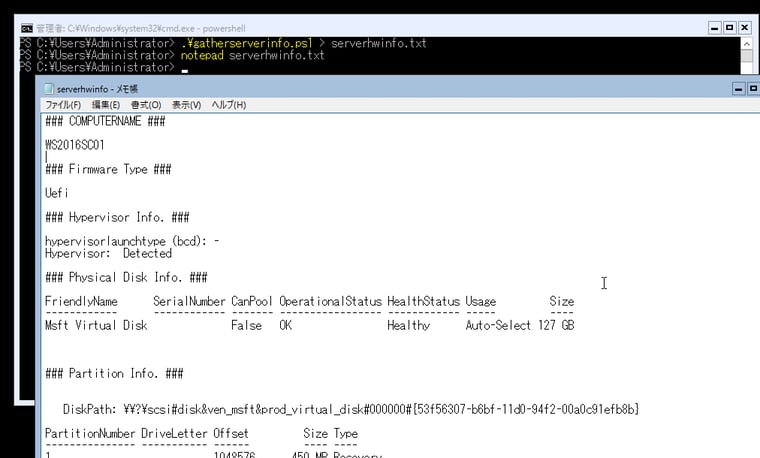
画面1 SSD-assistanceが収集しない情報は、独自のスクリプトで収集しておくと、リプレースやP2V移行に役立つ
なお、このスクリプトのセキュアコアサーバー機能の対応状況の部分は、以下の記事でも使用した、Windows Admin Center(WAC)のPowerShellスクリプトからコピーしたものを使用しています。
vol.43 セキュアコアPC/サーバーの対応状況を確認する|コマンド&スクリプト強化週間
[gatherserverinfo.ps1](プレーンテキストで表示、出力例)
$firmware = (Get-ComputerInfo).BiosFirmwareType
$bootinfo = bcdedit /enum | Select-String "hypervisorlaunchtype"
$sysinfo = & cmd /c "chcp 437 > null && systeminfo " | Out-String
$pdisk = Get-PhysicalDisk
$partition = Get-Partition
$volume = Get-Volume
$netadapter = Get-NetAdapter | Select Name,ifIndex,Status,MacAddress
$ipconf = Get-NetIpConfiguration
if (Get-Command Get-BitLockerVolume -ErrorAction SilentlyContinue){
  $bvolumes = Get-BitLockerVolume | Select VolumeType,MountPoint,CapacityGB,VolumeStatus,KeyProtector,ProtectionStatus
} else {
  $bvolumes = $null
}
Write-Output "### COMPUTERNAME ###"
Write-Output ""
$env:COMPUTERNAME
Write-Output ""
Write-Output "### Firmware Type ###"
Write-Output ""
$firmware
Write-Output ""
Write-Output "### Hypervisor Info. ###"
Write-Output ""
if ($bootinfo -match "auto") {
  Write-Output "hypervisorlaunchtype (bcd): Auto"
} elseif ($bootinfo -match "off") {
  Write-Output "hypervisorlaunchtype (bcd): Off"
} else {
  Write-Output "hypervisorlaunchtype (bcd): -"
}
if ($sysinfo -match "A hypervisor has been detected") {
  Write-Output "Hypervisor:  Detected"
} else {
  Write-Output "Hypervisor:  Not Detected"
}
Write-Output ""
Write-Output "### Physical Disk Info. ###"
$pdisk |Format-Table -AutoSize
Write-Output ""
Write-Output "### Partition Info. ###"
$partition |Format-Table -AutoSize
Write-Output ""
Write-Output "### Volume Info. ###"
$volume |Format-Table -AutoSize
Write-Output ""
Write-Output "### Network Adapter Info. ###"
$netadapter | Format-Table -AutoSize
Write-Output ""
Write-Output "### IP Configuration Info. ###"
$ipconf |Format-List
Write-Output ""
Write-Output "### BitLocker Info. ###"
ForEach ($bvolume in $bvolumes) {
  if($bvolume.ProtectionStatus -eq "on"){
    $bvolume | Format-Table -AutoSize
    $bvolume.KeyProtector |Select KeyProtectorType, RecoveryPassword
  }
}

Write-Output ""
Write-Output "### Hardware Security Info. ###"
Write-Output ""

### copy from WAC (v2) ###
# tpm version check
function CheckTpmVersion {
  $TpmObj = Get-CimInstance -classname Win32_Tpm -namespace root\cimv2\Security\MicrosoftTpm

  if ($null -ne $TpmObj) {
    return $TpmObj.SpecVersion[0] -eq "2"
  }

  return $false
}

<#
Check whether VBS is enabled and running
0.	VBS is not enabled.
1.	VBS is enabled but not running.
2.	VBS is enabled and running.
#>
function CheckVBS {
  return (Get-CimInstance -classname Win32_DeviceGuard -namespace root\Microsoft\Windows\DeviceGuard).VirtualizationBasedSecurityStatus
}

<#
# device guard checked used for hcvi and system guard
0.	No services running.
1.	If present, Windows Defender Credential Guard is running.
2.	If present, HVCI is running.
3.	If present, System Guard Secure Launch is running.
4.	If present, SMM Firmware Measurement is running.
#>
function CheckDGSecurityServicesRunning($_val) {
  $DGObj = Get-CimInstance -classname Win32_DeviceGuard -namespace root\Microsoft\Windows\DeviceGuard

  # loop to avoid out of index out of bounds errors
  for ($i = 0; $i -lt $DGObj.SecurityServicesRunning.length; $i++) {
    if ($DGObj.SecurityServicesRunning[$i] -eq $_val) {
      return $true
    }
  }

  return $false
}

<#
Indicates whether the Windows Defender Credential Guard or HVCI service has been configured.
0.	No services configured.
1.	If present, Windows Defender Credential Guard is configured.
2.	If present, HVCI is configured.
3.	If present, System Guard Secure Launch is configured.
4.	If present, SMM Firmware Measurement is configured.
#>
function CheckDGSecurityServicesConfigured($_val) {
  $DGObj = Get-CimInstance -classname Win32_DeviceGuard -namespace root\Microsoft\Windows\DeviceGuard
  if ($_val -in $DGObj.SecurityServicesConfigured) {
    return $true
  }

  return $false
}

# bootDMAProtection check
$bootDMAProtectionCheck =
@"
  namespace SystemInfo
    {
      using System;
      using System.Runtime.InteropServices;

      public static class NativeMethods
      {
        internal enum SYSTEM_DMA_GUARD_POLICY_INFORMATION : int
        {
            /// </summary>
            SystemDmaGuardPolicyInformation = 202
        }

        [DllImport("ntdll.dll")]
        internal static extern Int32 NtQuerySystemInformation(
          SYSTEM_DMA_GUARD_POLICY_INFORMATION SystemDmaGuardPolicyInformation,
          IntPtr SystemInformation,
          Int32 SystemInformationLength,
          out Int32 ReturnLength);

        public static byte BootDmaCheck() {
          Int32 result;
          Int32 SystemInformationLength = 1;
          IntPtr SystemInformation = Marshal.AllocHGlobal(SystemInformationLength);
          Int32 ReturnLength;

          result = NativeMethods.NtQuerySystemInformation(
                    NativeMethods.SYSTEM_DMA_GUARD_POLICY_INFORMATION.SystemDmaGuardPolicyInformation,
                    SystemInformation,
                    SystemInformationLength,
                    out ReturnLength);

          if (result == 0) {
            byte info = Marshal.ReadByte(SystemInformation, 0);
            return info;
          }

          return 0;
        }
      }
    }
"@
Add-Type -TypeDefinition $bootDMAProtectionCheck

function checkSecureBoot {
  if ((Get-Command Confirm-SecureBootUEFI -ErrorAction  SilentlyContinue) -ne $null) {
    <#
    For devices that Standard hardware security is not supported, this means that the device does not meet
    at least one of the requirements of standard hardware security.
    This causes the Confirm-SecureBootUEFI command to fail with the error:
      Cmdlet not supported on this platform: 0xC0000002
   #>
    try {
      return Confirm-SecureBootUEFI
    }
    catch {
      return $false
    }
  }
  return $false
}
### copy from WAC (v2) ###


switch (CheckVBS) {
0 { Write-Output "VBS (Virualization-Based Security): Disabled" }
1 { Write-Output "VBS (Virualization-Based Security): ON (not running)" }
2 { Write-Output "VBS (Virualization-Based Security): ON" }
}
$osBuildNumber = [int](Get-CimInstance Win32_OperatingSystem).BuildNumber
$osVersion22H2 = 20349;
if ($osBuildNumber -le $osVersion22H2) {
  if (CheckDGSecurityServicesRunning(3) ) {
     Write-Output "HVCI (Hypervisor-Protected Code Integrity): ON (Secure Launch)"
  } else {
     Write-Output "HVCI (Hypervisor-Protected Code Integrity): OFF"
  }
} else {
  if (CheckDGSecurityServicesRunning(2) ) {
     Write-Output "HVCI (Hypervisor-Protected Code Integrity): ON"
  } else {
     Write-Output "HVCI (Hypervisor-Protected Code Integrity): OFF"
  }
}
if (CheckTpmVersion -eq 2){
  Write-Output "TPM (Trusted Platform Module) 2.0: ON"
} else {
  Write-Output "TPM (Trusted Platform Module) 2.0: Not Supported"
}
if (CheckSecureBoot) {
  Write-Output "Secure Boot: ON"
} else {
  Write-Output "Secure Boot: OFF"
}
if ([SystemInfo.NativeMethods]::BootDmaCheck() -ne 0) {
  Write-Output "boot DMA Protection: ON"
} else {
  Write-Output "boot DMA Protection: Not Supported"
}
連載「Windows Server 2016 EOS まであと X 日」シリーズの目次※ 2026年9月1日追記) 重要: 2026年4月1日以降に提供が開始されるESUは、オンプレミス、Azureに関係なく同一の価格体系で提供されることになりました。 → ITニュース. Azure Arc経由のWindows Server 2016 ESUが購入可能に(重要な追加情報あり) |
|
1. ギリギリのEOS対策に終止符を(あと460日) 3. アップグレード or クリーンインストール?(あと460日) |
13. Hyper-V環境の移行: VMの移行(動)(あと421日) 14. Hyper-V環境の移行: 移行VMのvTPMエラー問題(あと421日) 15. Hyper-V環境の移行: VMのライフサイクル10年問題(あと418日) 16. 最新OS、最新ハードウェアへ移行するメリット(あと413日) 17. 老朽化物理サーバーは、P2VでHyper-Vへ(前編)(あと411日) 18. 老朽化物理サーバーは、P2VでHyper-Vへ(後編)(あと407日) 19. Active Directoryのアップグレード(あと404日) 20. 仮想化とActive Directoryの考慮点(あと400日) 21. アップグレード後に確認すべきポイント(あと397日) 22. サーバー設定仕様書の更新(あと393日) 23. カスタムスクリプトでデータ収集を補完(あと390日) |